Docs / User Guide / Achievements
Achievements#
Some games have achievements: goals like clearing a level or passing a score. Each one unlocks the moment you reach it, and your best score goes on the game's leaderboard. The same window holds a chat for everyone signed in. Part of the User Guide.
Beta. Achievements is new and still settling: sets, points and scoring may change, and a result may be reset if a set is corrected.
The Achievements window#
ACHIEVEMENTS in the header, or Cmd+Shift+O (Ctrl+Shift+O on Windows and Linux), opens a window with five tabs:
| Tab | What it shows |
|---|---|
| GAME | The loaded game's achievements and high scores. |
| ACTIVITY | Everyone's latest unlocks and scores, or only the loaded game's. |
| CHAT | The chat. |
| GAMES | Every game with achievements. |
| ACCOUNT | Signing in, your passkeys and your recovery code. |
On a desktop the window floats over the running game: drag it by its title bar, resize it from its edges, and it opens where you left it. The dock button docks it on the right, full height, beside the app. In fullscreen it always docks, opened by the trophy next to ✕. On a phone it fills the screen, and Back closes it. Esc closes it anywhere.
Typing in the window never reaches the C64. A player's name or a game title opens their profile or the game's page, and ‹ goes back.
Playing for achievements#
Load a game from GAMES and play. Achievements count only with the exact file the game's page names under Achievements need this version. Another release, or a copy that differs by a byte, has none.
When a game with achievements loads, the window opens on its GAME tab. On a phone or in fullscreen, the ACHIEVEMENTS button flashes three times instead.
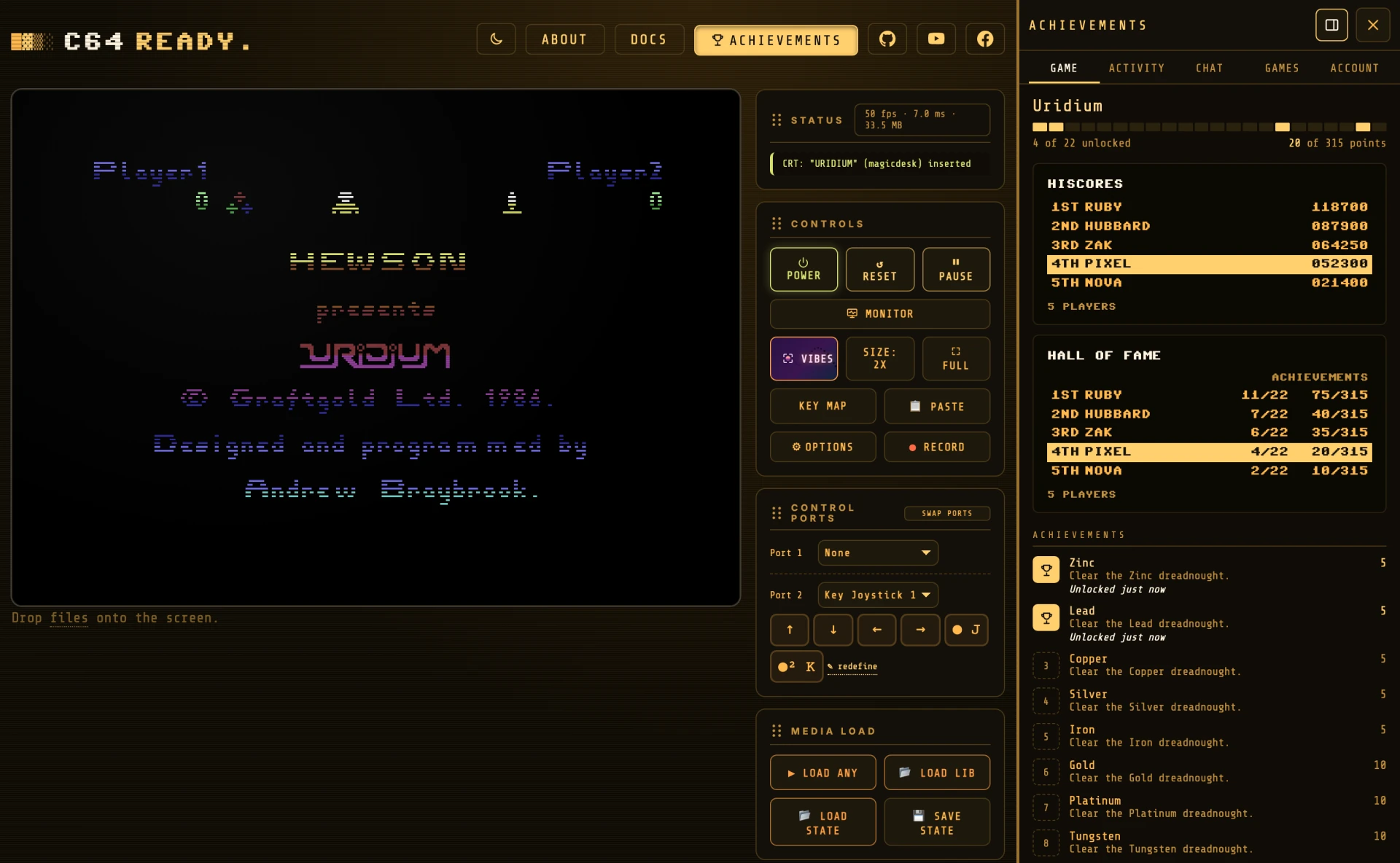
The GAME tab shows:
- Progress: a cell per achievement, lit for the ones you have, and your points.
- The high-score screen, in the game's own style, with your row highlighted. Equal scores share a place.
- The achievements: what each takes, its points, and when you unlocked it.
A notification tells you when you unlock one. When a game ends, your score is posted and the leaderboard keeps your best. Signed out, you see unlocks, and they are saved when you sign in on this page.
Some games notice a trainer or cheat, such as unlimited lives, and C64 READY. says so when it is on.
A game stays on while you turn its tape over or change its disk. Ejecting its cartridge ends it, and so does a reset once none of its files is loaded.
To play without achievements, turn them off in Options ▸ Other ▸ ACHIEVEMENTS. Nothing you load is looked at then.
Games with achievements#
| Game | Achievements | High scores | The file it needs |
|---|---|---|---|
| Action Biker | 41 | yes | OneLoad64 v5: Action Biker.crt |
| Bomb Jack | 19 | yes | OneLoad64 v5: Bomb Jack.crt |
| Chuckie Egg | yes | OneLoad64 v5: Chuckie Egg.crt |
|
| Commando | 14 | yes | OneLoad64 v5: Commando.crt |
| Commando Arcade | 14 | yes | Nostalgia's EasyFlash CommandoArcade_N0S_EF.crt, or OneLoad64 v5 extras: Commando Arcade - Special Edition [EasyFlash].crt |
| Defender of the Crown | 6 | OneLoad64 v5 extras: Defender of the Crown [EasyFlash].crt |
|
| Forbidden Forest | 16 | yes | OneLoad64 v5: Forbidden Forest.crt, or c64cade's cartridge |
| Galaga (Arlasoft) | yes | OneLoad64 v5: Galaga (Arlasoft - 2021).crt, or c64cade's galagaV106_FH.d64 |
|
| Ghosts 'n Goblins | 15 | yes | OneLoad64 v5: Ghosts'n Goblins.crt |
| Gribbly's Day Out | yes | OneLoad64 v5: Gribbly's Day Out.crt |
|
| IK+ | 13 | yes | OneLoad64 v5: IK+.crt |
| Mario's Cement Factory | 15 | Game A and Game B | c64cade's PRG, or mario-cf131.prg |
| Mole Attack | yes | OneLoad64 v5 extras: Mole Attack.crt (the official cartridge), or c64cade's PRG |
|
| Munchy Worm | yes | c64cade's munchyworm_1_01.d64 |
|
| Nemesis | 22 | yes | OneLoad64 v5: Nemesis.crt |
| Out Run | 8 | yes | OneLoad64 v5: Out Run (Route A) (J1).crt, Route B or Route C, or MultiLoad64: Out Run (by $olo1870) [EasyFlash].crt |
| Panther | yes | OneLoad64 v5: Panther.crt, or c64cade's cartridge |
|
| Rainbow Islands | 24 | yes | OneLoad64 v5 MultiLoad64: Rainbow Islands (by $olo1870) [EasyFlash].crt, or c64cade's copy |
| Road Runner | yes | OneLoad64 v5 MultiLoad64: Road Runner (by $olo1870) [EasyFlash].crt |
|
| Roc'n Rope | yes | c64cade's rocknrope.crt (the Broken Bytes conversion) |
|
| Stix | yes | OneLoad64 v5: Stix (J1).crt, the official cartridge Stix.crt in the extras, or c64cade's PRG |
|
| Super Mario Bros 64 | 17 | yes | OneLoad64 v5: Super Mario Bros 64 (Zeropaige - 2019).crt |
| The Last Ninja | 5 | OneLoad64 v5 MultiLoad64: Last Ninja, The (by $olo1870) [EasyFlash].crt |
|
| The Way of the Exploding Fist | 10 | yes | OneLoad64 v5: Way of the Exploding Fist, The.crt |
| Thrust | yes | OneLoad64 v5: Thrust (J1).crt |
|
| Uridium | 22 | yes | OneLoad64 v5: Uridium.crt |
| Vegetables Deluxe | Shopping, Classic and Countdown | c64cade's vegdlxnointro.prg |
All but Bomb Jack, Commando, Commando Arcade, Defender of the Crown, Ghosts 'n Goblins, IK+, Nemesis, Out Run, Super Mario Bros 64, The Last Ninja and The Way of the Exploding Fist are ported from c64-cheevos by hayesmaker (MIT), the achievements of C64Cade.
Activity, games and profiles#
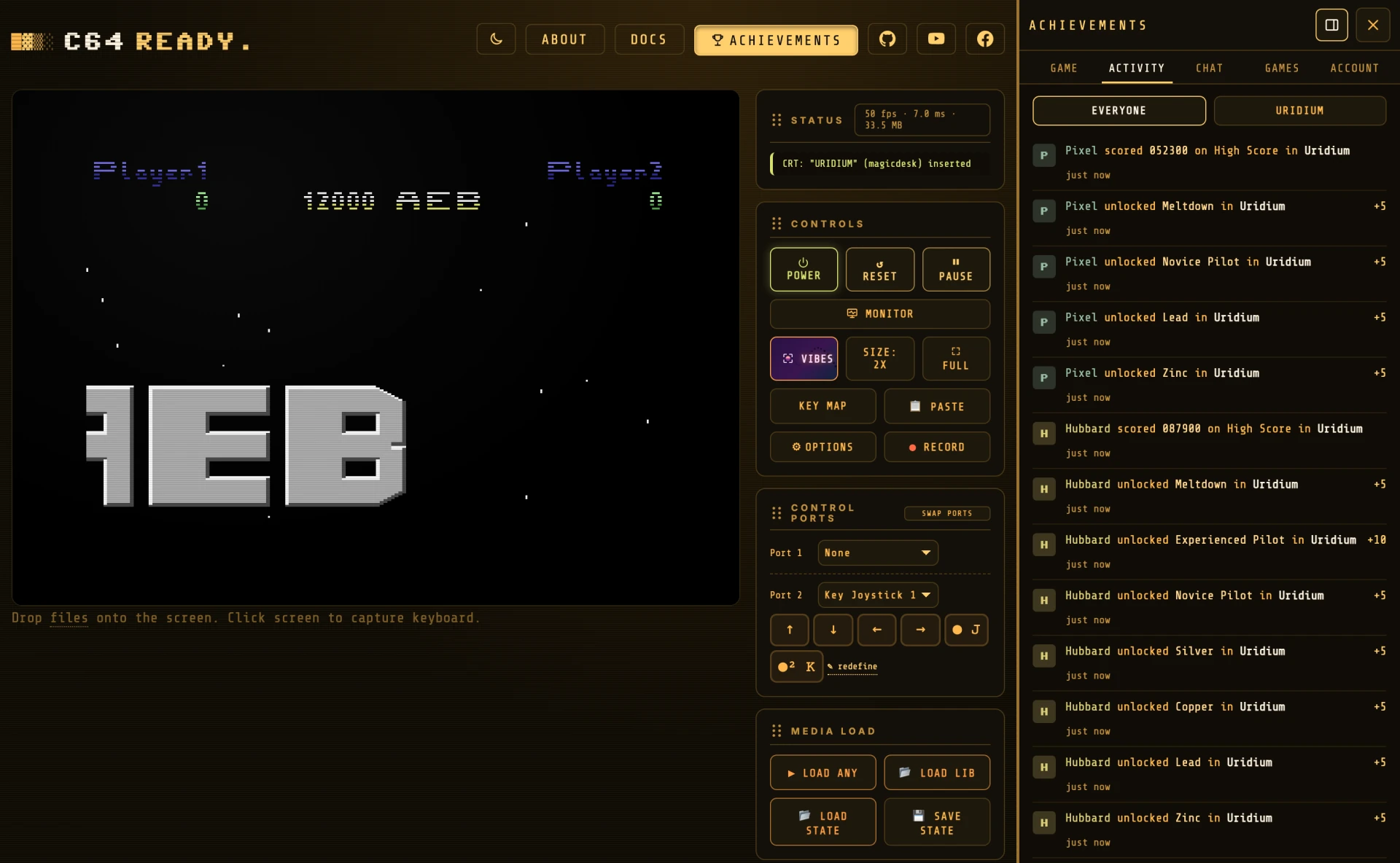
ACTIVITY lists everyone's latest unlocks and best scores. The button with the loaded game's name narrows it to that game, and LOAD MORE at the bottom brings older entries, a page at a time. A game's own activity, on its page, pages the same way. A player keeps the same colour here and in the chat.
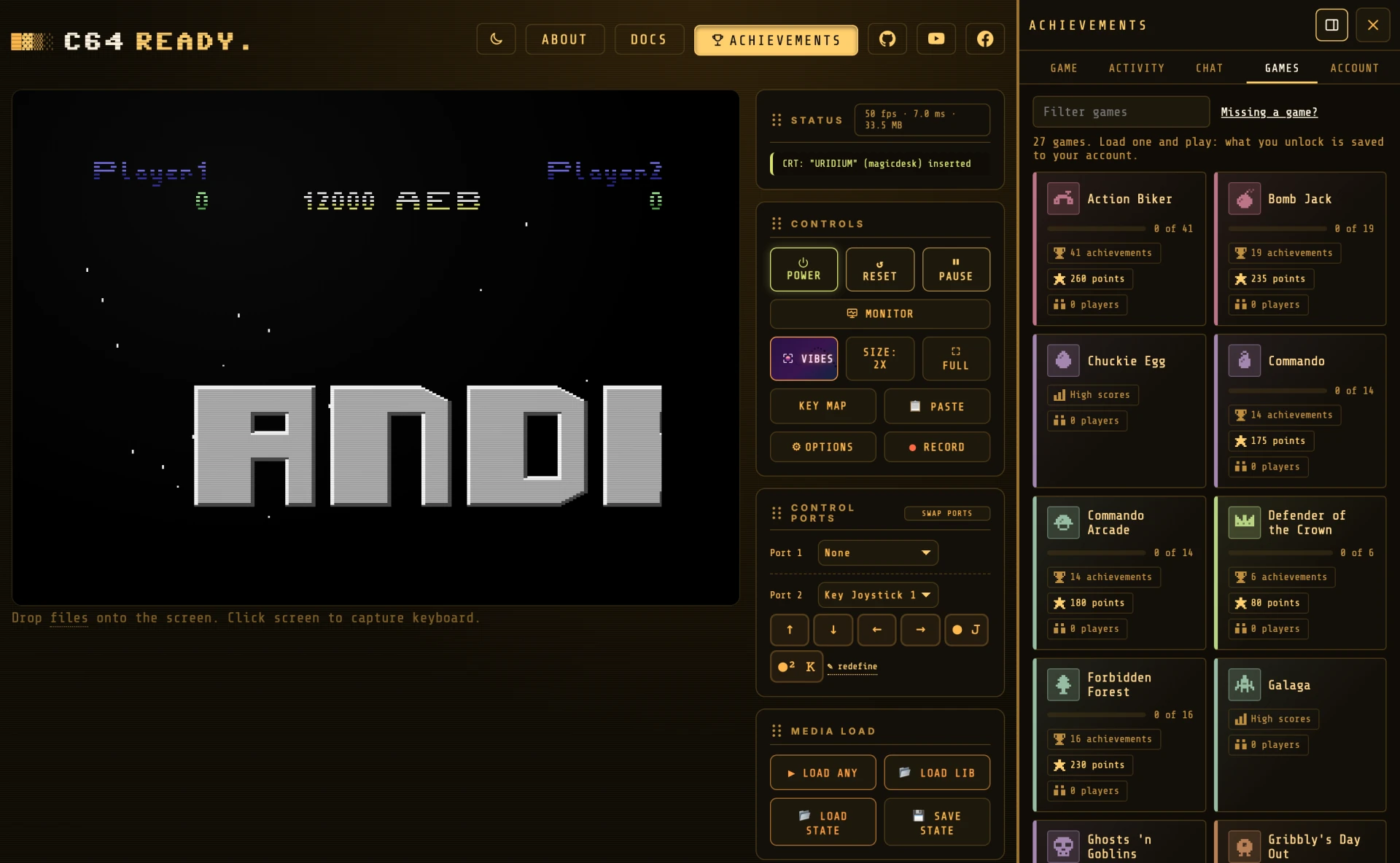
GAMES has a card for each game, with your progress and how many have played it. Filter games narrows the list by title. A game's page shows its high-score screen, its achievements, its activity and the versions it accepts.
A player's profile shows their points, and their progress and best scores in each game they have played.
Chat#
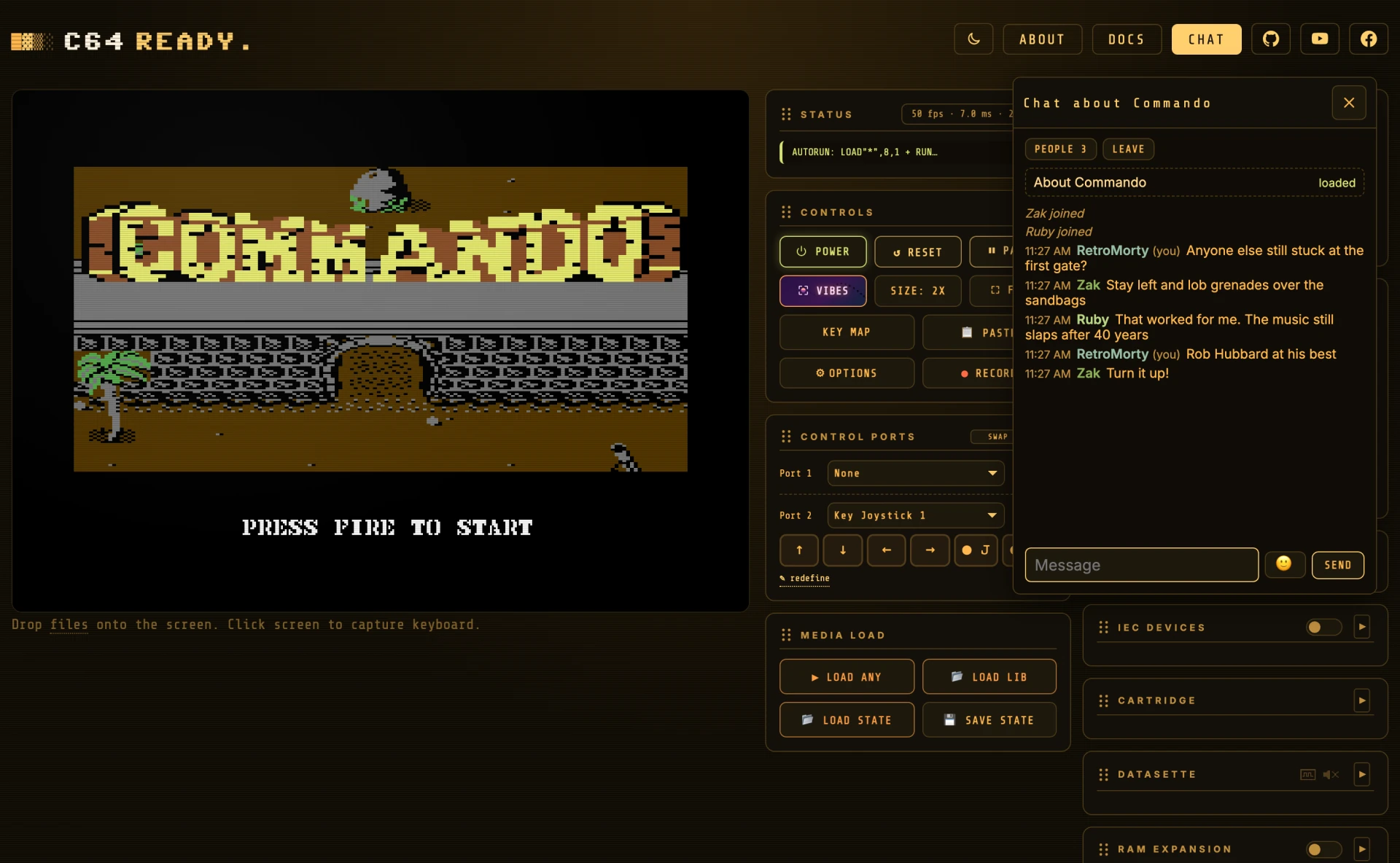
The chat is one conversation for everyone signed in. It connects only when you open the CHAT tab.
Joining#
The chat needs an account, and your username is your name there. Signed out, SIGN IN takes you to the ACCOUNT tab. Signing out leaves the chat.
Talking#
| Control | What it does |
|---|---|
| SEND | Sends your message, up to 280 characters. |
| 🙂 | Picks an emoji for your message. |
| PEOPLE | Who is in the chat. Anyone whose connection dropped is marked away for a minute. |
Type @ to mention a game with achievements. A list of matching games opens as you type, with the loaded one first. Pick one with the arrow keys and Enter, or a click. In the message the game shows as a link in its colour, and clicking it opens the game's page under GAMES.
Unlocks and new best scores are in ACTIVITY, not in the chat. Closing the window does not leave the chat: the ACHIEVEMENTS button counts new messages.
Moderation#
Under PEOPLE, next to each member:
- hide hides their messages on your screen, and show brings them back.
- vote to remove removes them for an hour once a majority of the others agree, and always at least two people. Connections from one place count as one vote.
- report sends them, with the recent messages, to the admin.
The admin can also mute, remove and ban, and delete messages.
Missing a game?#
A game has achievements when it has a set: a file naming the game, the exact file it is for, and each achievement and high score as conditions on the machine's memory. Anyone can ask for a set, or write one.
Ask for a game#
Open an issue on GitHub with the game's title, where your file comes from (OneLoad64, an Assembly64 or CSDb release), and its MD5 fingerprint:
| System | Command |
|---|---|
| macOS | md5 "Ghosts'n Goblins.crt" |
| Windows | certutil -hashfile "Ghosts'n Goblins.crt" MD5 |
| Linux | md5sum "Ghosts'n Goblins.crt" |
Do not attach the game: it is copyrighted, and the fingerprint is all a set needs.
Write a set#
- Fork the repository and add
server/sets/<game>.json. The server's README describes the format, and the sets inserver/sets/are examples. - Write the conditions in rcheevos syntax, as RetroAchievements does. Guard them so nothing fires on the title screen or in a demo.
- Run
npm run dev, load the game and play: your set shows under GAMES. - Add a test like
test/achievements/uridium-set-spec-test.js, and open a pull request with the set and the test.
If your set builds on someone else's, name it and its license in source.
Your account#
An account is a username and a passkey: no password, no email. The passkey signs you in with your device's fingerprint, face or PIN, and your browser or password manager keeps it.
- CREATE ACCOUNT picks a username (up to 16 characters) and makes a passkey. UPLOAD BADGE there is optional.
- SIGN IN WITH PASSKEY uses a passkey on this device, or one from your phone.
- SIGN OUT signs this browser out. DELETE ACCOUNT deletes the account with its achievements and scores, and frees the name.
Your badge#
A badge is a picture of your choice. It shows on your profile and beside your name in the activity. Add it on the sign-up form, or by clicking the badge square on your own profile. It is shrunk to fit 256×256 in the browser before it is uploaded, never cropped, and shows centred in its square. remove badge takes it down.
Your recovery code#
A new account shows its recovery code once: twenty letters and digits. Save it in your password manager or write it down. With your username, it gets you back in if you lose your passkey. NEW RECOVERY CODE replaces it.
More than one passkey#
ADD A PASSKEY makes another, on a second device or a security key, so losing one device does not lose the account. Passkeys lists them, and remove takes one off. An account keeps at least one.
Lost your passkey?#
Open ACCOUNT, choose Lost your passkey?, and enter your username and recovery code. RECOVER makes a new passkey on this device and signs you in. The code works once, so save the new one it shows. After five wrong codes, that address has to wait an hour.
What is shared#
C64 READY. fetches the list of games with achievements and compares your file with it in the browser. Only a game on that list is looked up, so the server never learns what else you load.
Your username, badge, achievements, best scores and activity are public.
The server keeps your username and badge, the public half of each passkey, a fingerprint of your recovery code (not the code), your sessions, and your achievements, scores and activity. Each sign-in, recovery and sign-out is logged with your IP address and browser for 90 days, readable only by the admin. Deleting the account deletes all of it.
In the chat, your name is visible while you are connected, and your messages go to everyone and to the admin. The admin sees a short code made from your IP address, not the address. The chat server logs messages, joins, leaves and moderation with your username and IP address for 90 days. Only the admin can read the log, and it is shared only when the law requires it. The last 100 messages are kept in memory until the server restarts.