Docs / Restoring C64 tapes: from a worn cassette to a .tap that loads
Restoring C64 tapes: from a worn cassette to a .tap that loads#
A Commodore 64 cassette from the 1980s may have suffered wear, dropouts or reduced high-frequency response over forty years. Play it into a sound card and you get a recording of all that wear. This guide is about getting the programs back out of it: what a tape actually holds, how C64 READY. reads a recording, how it mends what the tape lost, and how you can tell what survived.
The same decoder sits behind both tools: the Datasette in the emulator,
for one tape at a time, and c64rdy, the command line, for a shoebox of
them. Everything described here happens in both.

One cassette side, transferred from a worn original and restored: nineteen
programs, every one booted and playing. The CLI made this picture with
c64rdy run side-a.tap --all --collage --anim.
What is on a tape#
A C64 does not record sound on a cassette, and it does not record bytes either. It records timing. The machine's tape port flips a signal, and the Datasette writes each flip onto the tape. Reading it back, the machine measures the time between successive falling edges. Those intervals encode the data.
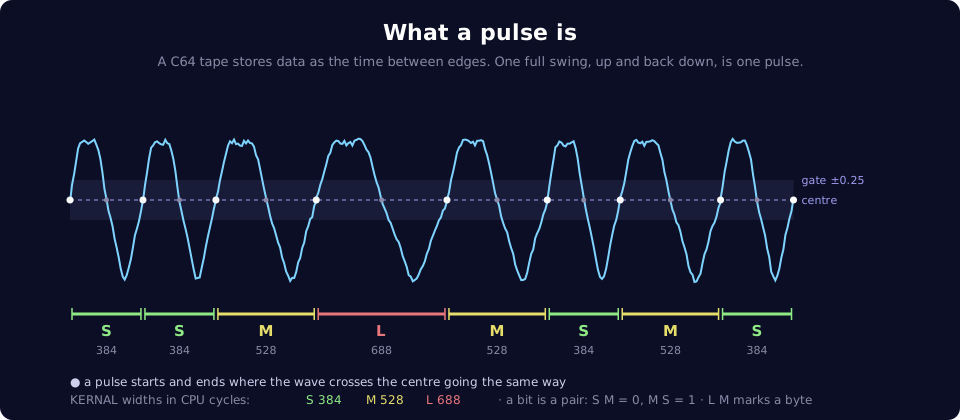
One full swing of the signal, up and back down, is a pulse, and its width is measured in the C64's own clock cycles (about a million a second). The standard format the C64's built-in KERNAL writes uses three widths:
| Pulse | Width | Used for |
|---|---|---|
| Short | approximately 384 cycles | half of every bit |
| Medium | approximately 528 cycles | the other half |
| Long | approximately 688 cycles | the start of each byte |
A bit is a pair of pulses: short then medium is a 0, medium then short is a 1, and long then medium marks the start of a byte. A whole program is thousands of these pairs in a row.
Turbo loaders, which most commercial games use, work differently. Many use two shorter pulse lengths and more efficient encoding (Turbo Tape 64 uses approximately 216 and 328 cycles), which makes them considerably faster. Self-loading turbo tapes usually begin with a short KERNAL-format loader, which then reads the rest.
Seeing it for yourself#
The Datasette has a scope that draws the signal under the tape head as it plays. Load any tape, power on, press ▶ PLAY, and open it from the waveform button beside the card title:
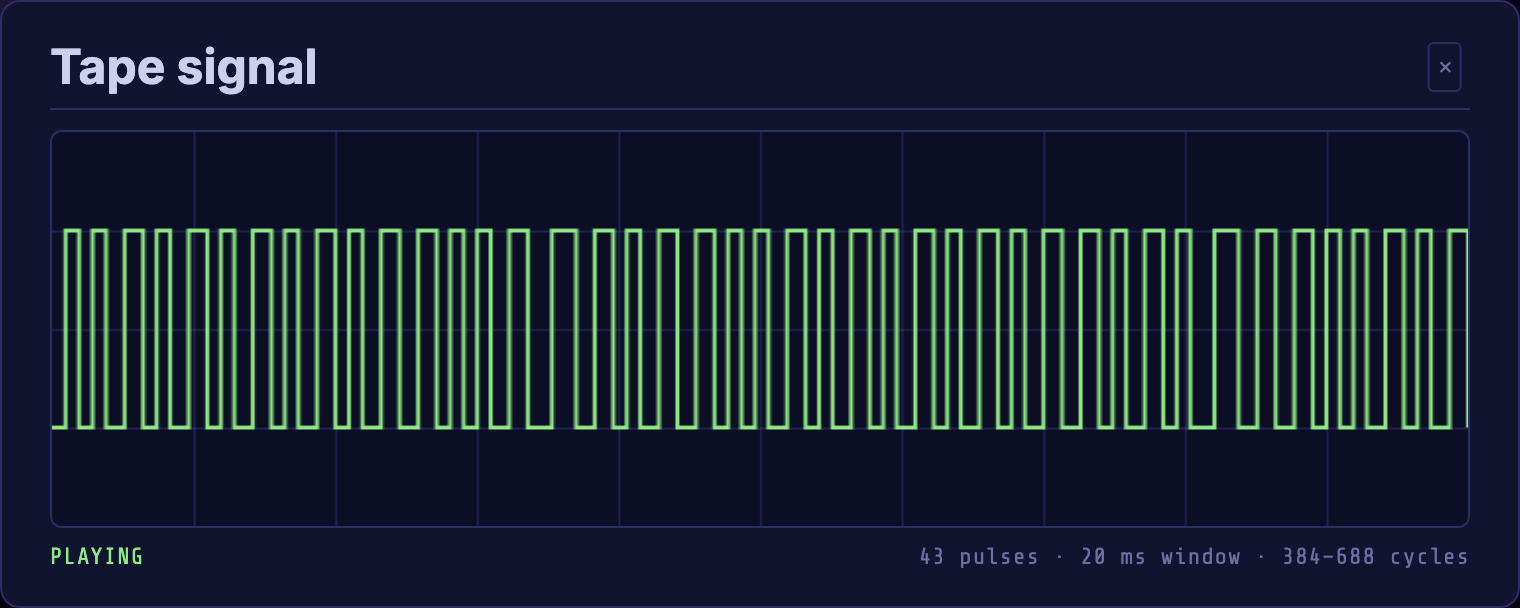
The window shows about 20 ms of tape, and the readout under it counts the pulses and gives the shortest and longest in cycles. On a KERNAL tape it settles at around 384–688, the three widths above. Wind on into a turbo file and the numbers drop to its two shorter widths.
The 🔊 button beside it plays the same signal out loud: not a sound effect, but the tape rebuilt from its pulses. A turbo loader screeches higher than the KERNAL's slow warble, because its pulses are shorter.
Both draw from the .tap in the deck, so what you see and hear is exactly
what the C64 reads. On a restored tape, that is the clean result, not the
worn recording.
What a .tap file is#
A .tap file is a header followed by encoded pulse durations. It has no directory and no file names of its own: those are inside the
pulses, written the way the C64 wrote them. That is why it is the right
container for a cassette: it keeps everything the tape did, including the
parts no one has identified yet, and any loader on the tape can read it.
Restoration, then, means one thing: turning a recording back into an accurate list of pulse widths.
Making the recording#
What you capture decides what can be recovered, so a few things are worth knowing before you press record.
- Capture playback in stereo if you can. A stereo head reads two portions of the mono track, giving the decoder slightly different readings to compare, and that is where most mending comes from.
- Any common sample rate works. Nothing is resampled: widths are measured in the recording's own samples and converted to cycles. 44.1 or 48 kHz is a practical starting point. At 48 kHz, samples are about 20 C64 cycles apart, while the widths a loader tells apart are 64 cycles or more apart. Actual timing accuracy also depends on signal quality.
- Leave the recording as it comes off the deck. Level and centre are measured every few milliseconds as the decoder goes, so there is no need to normalise. Filters and noise reduction reshape the very edges being timed.
- Keep the whole side. Silence between files is fine: it is how the decoder tells recordings apart.
.wav files of 8, 16, 24 or 32-bit PCM and 32 or 64-bit float are read, mono
or stereo. A DC2N .dmp dump also works: it captures the pulses directly
from a real Datasette, so it skips the reading stages. It then gets the KERNAL
repair and the clean rewrite of Turbo Tape 64 blocks, in the emulator and in
the CLI's dmp2tap alike.
How a recording becomes a tape#
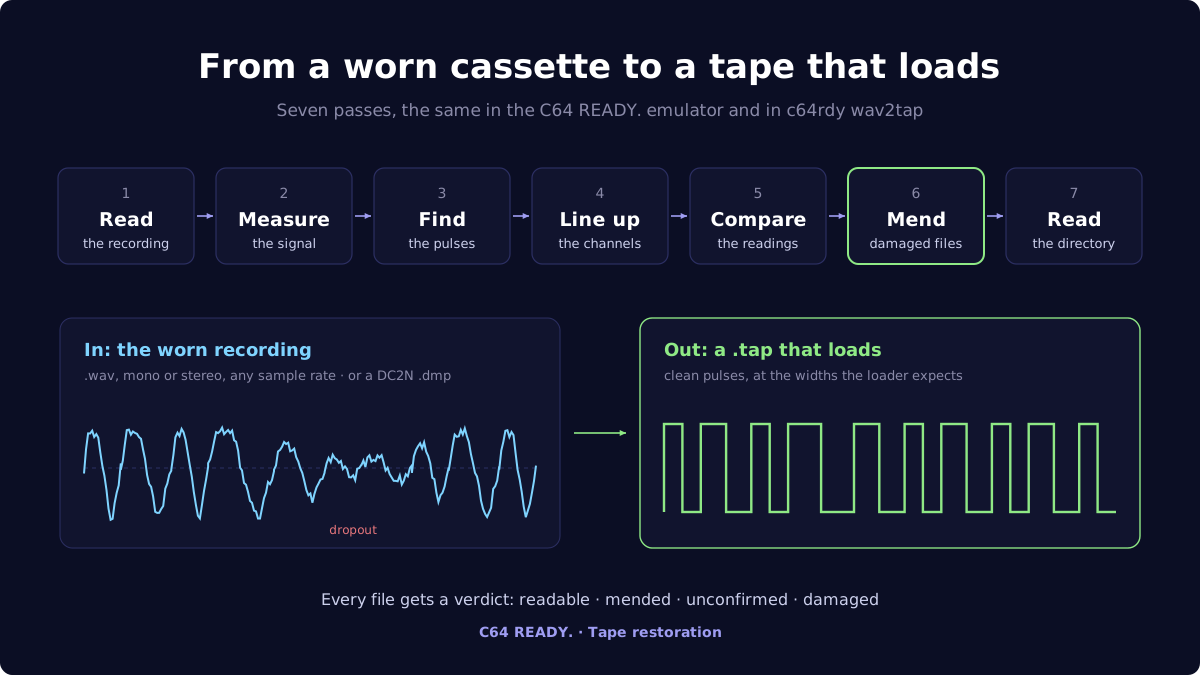
Load a .wav into the Datasette, or give it to c64rdy wav2tap, and it goes
through up to seven stages. The emulator's "Reading tape" dialog shows them by
name. A mono recording, or one read with --channel, skips lining up and
comparing, and mending only runs when a Turbo Tape 64 file is damaged.
Measuring the signal#
A half-hour recording does not hold one level. The tape gets louder and quieter, and its centre line drifts. So the decoder takes the level and centre locally, over windows of about 3 ms, smoothed across their neighbours. Each part of the tape is judged against its own surroundings, not against the loudest moment of the side.
Finding the pulses#
Every place the wave crosses its centre is a candidate edge. Hiss crosses the centre too, though, so a crossing only counts once the signal swings past a gate, a quarter of the local level either side of the centre (the shaded band in the pulse picture above). Noise inside the band is ignored, and a real swing goes through it.
Each crossing is placed between the two samples that straddle it, finer than the sample rate, and crossings are then paired into pulses. Which pairing is right depends on how the recording deck was wired, so the decoder picks the one that gives the fewest distinct widths. A home tape can hold recordings from decks wired either way up, so each stretch between silences chooses for itself.
Each pulse is measured on its own, so a small speed difference does not need correcting: the pulses are all a little short or long, and the loaders allow for that. The difference is measured and reported (for example, the captured pulse timings differ from nominal by 3.1%), but not changed.
Lining up the channels#
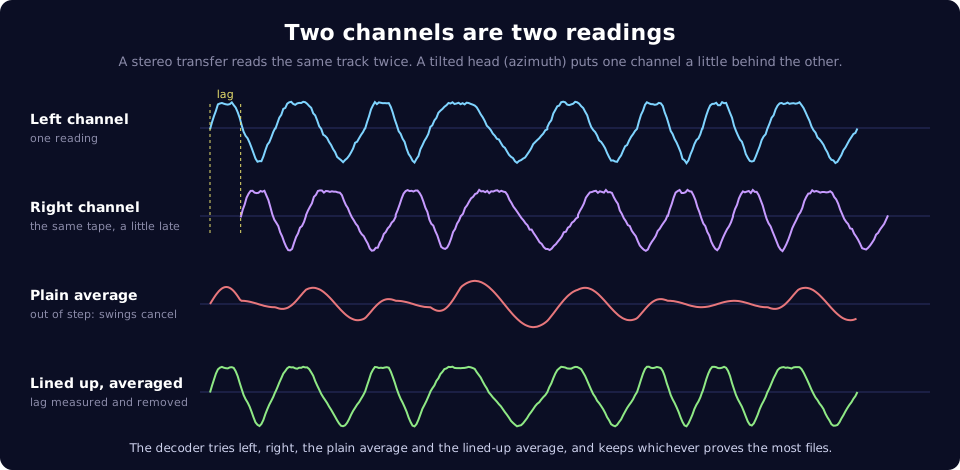
A cassette head is rarely perfectly square to the tape, so in a stereo recording one channel runs slightly behind the other. Simply averaging the two then cancels the signal wherever they are out of step: on one tape here a plain average listed 1 file of 8, where the lined-up average listed 12 of 14.
So the decoder measures that delay, lines the channels up, and reads the tape four ways: each channel alone, the plain average and the lined-up average.
Comparing the channels#
Each reading is decoded completely, and the one that reads the most files (complete, with checksums that add up) becomes the tape. Nothing is scored by how clean the signal looks. The files themselves decide.
Mending#
Dropouts briefly weaken or interrupt the signal, and poor tape-to-head contact and other playback problems can also blur edges until separate pulses appear to merge. Mending recovers what a damaged file said, using evidence retained in the recording. Here, confirmed means supported by agreeing readings and checksum checks, not guaranteed identical to the original. Results supported by only one reading, or assembled from partial readings, are marked unconfirmed, and a file that cannot be recovered is left as it was and marked.
A KERNAL file: the second copy#
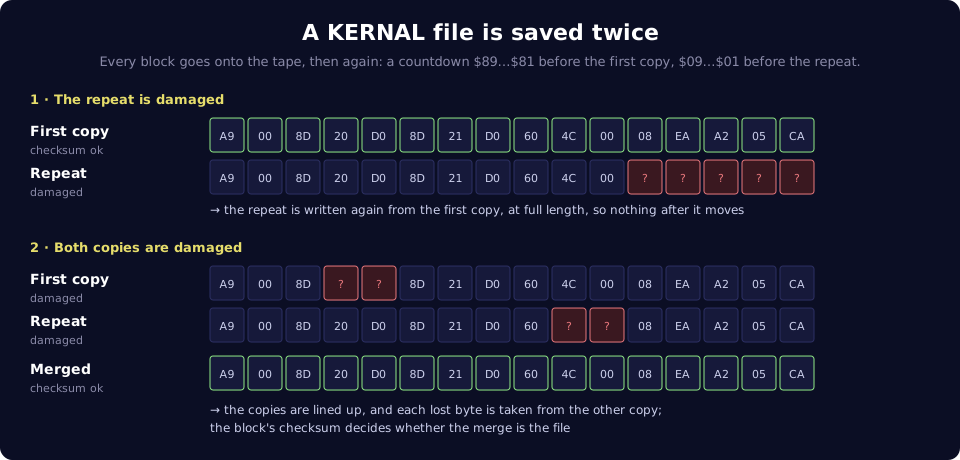
The KERNAL writes every block twice, one copy straight after the other.
On load, the C64 reads both, and a damaged repeat can still hang the machine
or end in ?LOAD ERROR even when the first copy was fine.
- If one copy is whole, the damaged one is written again from it, at full length. The silence after it takes up any difference, so everything after it on the tape stays where it was. If a later recording overwrote the end of the copy, the tape grows by the missing time instead, so the next file keeps its whole lead-in.
- If both are damaged, but in different places, they are lined up and merged, each lost byte taken from the other copy. The block's own checksum decides whether the merge is the real file or is thrown away.
Lining the copies up is not as simple as counting bytes, because a dropout does not say how many it swallowed. Two copies of one 2052-byte block differed in 1658 positions when counted from the start, and in none once properly aligned.
A turbo file: reading again#
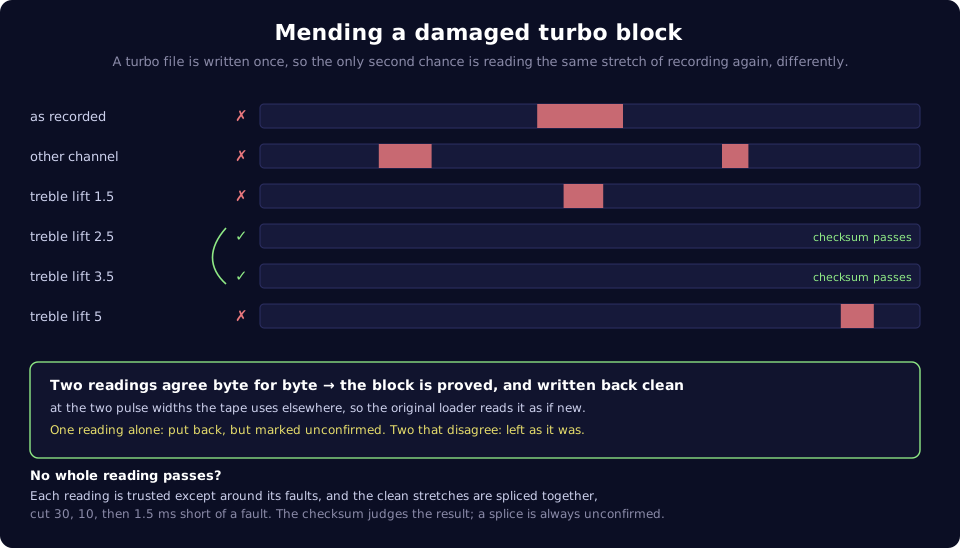
A turbo file is written only once, so there is no second copy. The second chance is the recording itself: the damaged stretch is read again, in every way available.
- The other channel, both averages, and the difference between the channels.
- Treble lifts from 1.5 to 5 times, which bring back the edges that spacing loss blurred.
An 8-bit checksum can miss errors, so a passing checksum alone is not enough to confirm a recovery. A block is confirmed when two readings agree byte for byte and pass the checksum: stronger evidence, though they can still share an error. One reading alone is still put back, but reported as unconfirmed. Two that check out but disagree leave the file untouched.
When no whole reading passes, the clean stretches of several readings can be spliced together, each cut a safe margin short of its next fault. The checksum judges the result, and a splice is always reported as unconfirmed.
Turbo mending applies to Turbo Tape 64 files, and needs a recording to read
again, so a .dmp dump gets only the KERNAL repair and the clean rewrite
below. Other turbo formats are not mended.
Written back clean#
When a recording or a dump is converted, every Turbo Tape 64 data block whose bytes check out is rewritten at the exact widths the tape uses elsewhere. A lifted or averaged reading shifts widths slightly, a dump carries its own deck's speed and spread, and a 1980s loader has a fixed threshold where the decoder adapts. Rewriting means the tape's own loader reads the block as if it were new.
What it achieves, and what it cannot#
On the test set of eight worn cassettes this was built against, 66 of 129 files loaded before mending, and 121 of 130 after. The total rises by one because mending made one more file readable enough to be found at all. Each was checked by loading it, through the real KERNAL or the tape's own loader: evidence that it loads, not proof of a perfect restoration.
What is left is beyond these recordings:
- Signal missing from the capture. One file has 923 ms missing, another 685 ms. A gap like that may reflect tape damage or a playback problem, so another transfer can sometimes recover more.
- A pulse that landed on the wrong side. Sometimes every pulse is a legal width and the block is complete, yet the checksum is out by a bit or two: one pulse drifted into the range of the other symbol. There is nothing to cut around.
There is no explicit correction for wow, flutter or overall speed. The decoder tolerates some timing variation, but larger changes can still prevent recovery.
In the emulator#

- Load the recording. Press 📼 LOAD on the Datasette card (or ▶
LOAD ANY, or drop the file on the screen) and pick the
.wavor.dmp. - Watch it read. The "Reading tape" dialog names each pass and shows its progress. A 30-minute side is a few hundred megabytes of audio read several times over, so it takes a while. The emulator keeps running behind it.
- Read the verdict. The Status card reports what came out: how long the tape is, how many files, and whether any needed mending.
- See what is on it. 🔍 in the tape's info row lists every file, with its format, size and start time.
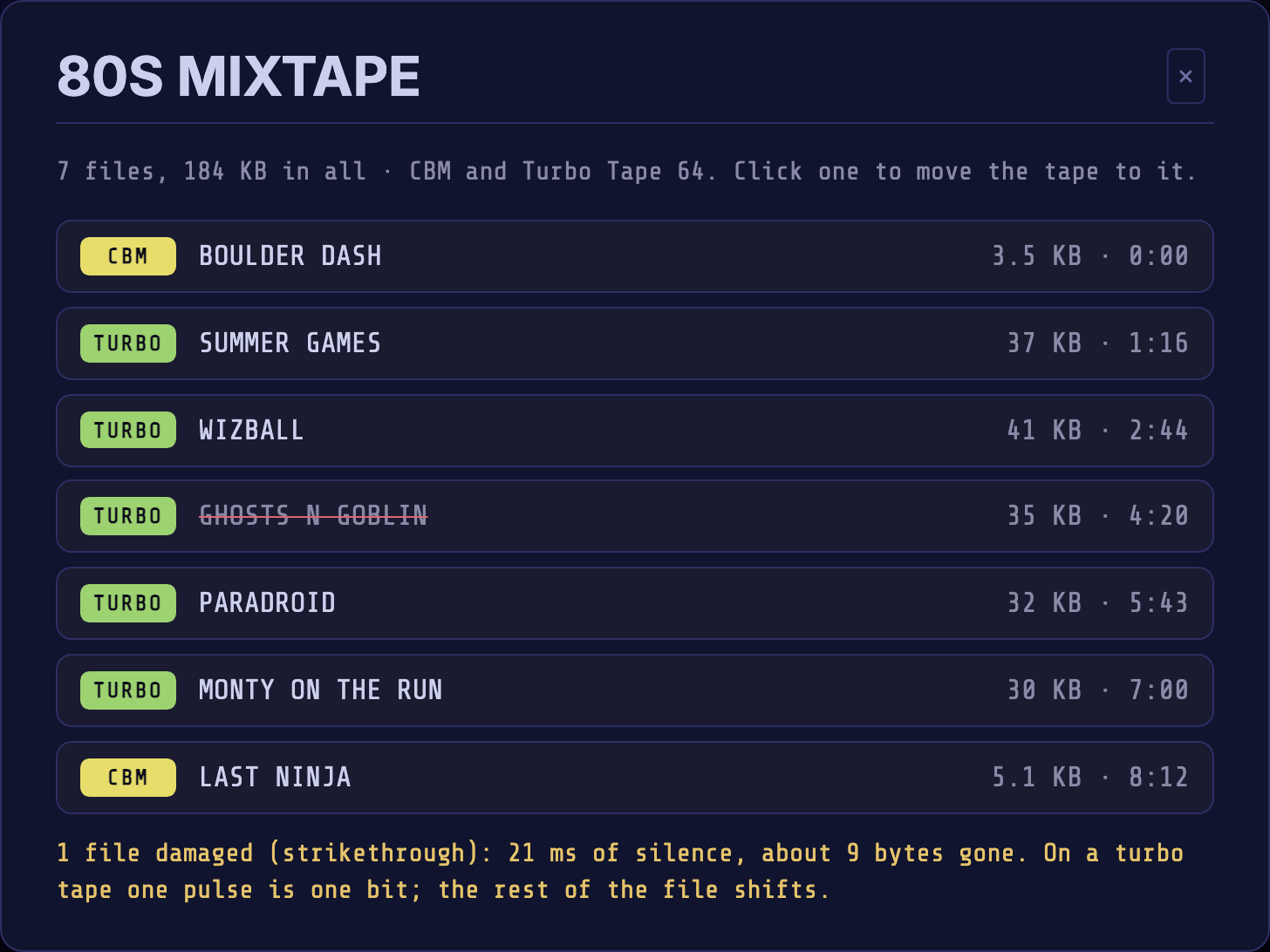
A file struck through could not be read whole. Hover it to see why, and
the note under the list counts them and says what was mended. Click a row
to wind the tape to that file's lead-in, then type LOAD and press ▶
PLAY.
- Keep it. The tape goes into your Library as a
.tap, and the recording itself is not stored. ⤓ .TAP downloads it, and ⤓ .WAV renders it back to clean audio you can play into a real C64.
The browser reads every recording as a PAL tape. For a tape written on an
NTSC machine, use the CLI's --ntsc.
The Media guide covers every button on the deck.
With the CLI#
c64rdy is for when you have more than one tape, or a recording too big to
drag into a browser. The command line guide shows how to
install it. It needs Node and nothing else.
Turn recordings into tapes#
c64rdy wav2tap ~/recordings/*.wav --out-dir tapes/
Each recording becomes a .tap, and each ends with its listing and a
summary:
6 of 7 files readable. 1 mended from a second reading.
If a block was put back on the word of a single reading, a further line names
it: Only one reading vouches for: ….
| Option | What it does |
|---|---|
--channel <n|mix|aligned> |
Use one particular reading of a stereo transfer, instead of the one that reads the most files |
--pre-emphasis <n> |
Lift the treble of the whole recording before reading |
--no-mend |
Skip the turbo re-reading and rewrite, to see the tape as it came |
--no-repair |
Skip the KERNAL second-copy repair |
--ntsc / --cpu-hz <hz> |
Measure widths for an NTSC machine, or any clock |
c64rdy dmp2tap turns a DC2N dump into a .tap the same way, and takes
--no-mend (skip the clean rewrite) and --no-repair too.
See what survived#
$ c64rdy dir "Tape 2 - Side B.tap"
Tape 2 - Side B.tap
16:03  ·  KERNAL + Turbo Tape 64  ·  18 files, 16 readable
The deck that wrote this ran 3.1% fast

   #  WIND TO  STARTS  NAME              FORMAT  LOAD         SIZE  STATUS
   1     0:02    0:09  TURBO TAPE 64     KERNAL  $0801-$1000    2K  ok
   2     0:57    0:59  OLYMPIA           Turbo   $0801-$1000    2K  ok
…
The header gives the whole side: how long it plays, which loader formats it carries, how far the pulse timings are off nominal, and how much of the tape holds signal no known loader reads. WIND TO is where a real deck must be wound back to for the loader to find the file, and STARTS is where its data begins.
dir takes a .wav directly too (decoding it on the way), --damaged shows
only the broken rows, and --pulses adds pulse positions for digging into a
particular stretch.
Check that it loads#
c64rdy loadtest tapes/side-a.tap
A clean listing says the checksums pass. loadtest goes further: it winds to
each file, loads it through the real KERNAL or the tape's own turbo loader,
and checks the memory it names actually filled. The listing gains a LOADS
column. It is slow and thorough, and --file NAME tests just one.
Look at the pulses#
c64rdy loader tape.tap
When part of a tape belongs to a loader nothing recognises, loader shows a
histogram of the pulse widths in that stretch, which names the two
symbols the unknown loader writes, and then the loader itself, taken out of
the tape and disassembled.
  0:22-5:53, 765753 pulses:
    CYCLES  PULSES
       296  434162
       584  331510
Mend, join and convert#
| Command | What it does |
|---|---|
tapfix side-a.tap |
Mends an existing .tap from what it holds (the KERNAL second copies), writing side-a-mended.tap |
tapcat side-a.tap side-b.tap -o tape.tap |
Joins tapes end to end, such as a side transferred in two halves |
tap2wav tape.tap |
Renders the tape back to clean audio, to play into a real C64 |
tap2prg, tap2d64, tap2t64 |
Takes the programs out onto .prg files, a disk image or a .t64 archive |
run side-a.tap --all --collage --anim |
Boots every program on the side and tiles them into one animated picture, like the one at the top of this page |
A shoebox of cassettes, start to finish#
- Record each side in stereo, as a
.wav, and name the files so you can tell the sides apart. - Decode them all at once:
c64rdy wav2tap ~/recordings/*.wav --out-dir tapes/ - Find what came out damaged:
c64rdy dir tapes/*.tap --damaged - Check the rest loads:
c64rdy loadtest tapes/side-a.tap - For a side that still fails, try again from the recording:
--channelto force the other reading, or--pre-emphasisfor a stronger treble lift. If the listing shows a gap where a file should be, it may reflect tape damage or a playback problem. Another transfer, perhaps on another deck, can sometimes recover more. - See them run:
c64rdy run tapes/side-a.tap --all --collage --anim
Reading the results#
| You see | It means |
|---|---|
ok |
The file decoded whole and its checksum passes. For a KERNAL file one good copy is enough, so loadtest is the surer check |
N of M files readable. |
M files found, N of them whole |
K mended from a second reading. |
Blocks recovered, from another reading or from the KERNAL's second copy, including unconfirmed ones |
Only one reading vouches for: … |
Put back on one reading's word: unconfirmed |
1 drop, 120 bytes lost |
Turbo files: the signal vanished from the capture, and a stretch of the file is missing |
40 bytes garbled |
Turbo files: the signal was there but unreadable, worth a lift or the other channel |
checksum fails |
Complete, but a bit is wrong somewhere |
cut short |
The file stops before its end: the recording or the tape ends early |
| ran 3.1% fast | The Turbo Tape 64 or Novaload pulses differ from nominal by 3.1%: usually fine for loading, and worth knowing. A KERNAL-only tape gives no figure |
| A name struck through (emulator) | Not readable whole: hover for the reason |
Garbled is the hopeful one: the signal is there, and a different reading may recover it. A drop means the capture has a gap, which may reflect tape damage or a playback problem. Another transfer can sometimes recover more.
Reference#
| Emulator | CLI | |
|---|---|---|
| Reads | .wav, .dmp, .tap |
.wav, .dmp, .tap |
| Writes | .tap, .wav |
.tap, .wav, .prg, .d64, .t64 |
| Machine | PAL | PAL, or NTSC with --ntsc |
| Mending | Always on for .wav and .dmp, not for a loaded .tap |
On for .wav and .dmp, with --no-mend and --no-repair to see the tape as it came. tapfix repairs a .tap |
| Listen to the tape | 🔊 | tap2wav, then play the file |
| See the pulses | The Tape signal scope | dir --pulses, loader |
Formats read: the KERNAL's own, Turbo Tape 64, GRL-Supertape, Novaload, US Gold / Datasoft, Gremlin Type 2, Ocean / Imagine, Freeload, Wildload and PROCASS. A tape written by another loader still restores as pulses and can still load. It just lists as signal no known format reads.
For the full method, with the measurements behind each choice, see the Datasette architecture page.
Compared with Audiotap and TAPClean#
The long-standing route from a cassette to a clean .tap takes two tools.
Audiotap turns a recording into
a .tap, and TAPClean, which
grew out of Final TAP (2001), checks and remasters it. Both are still
maintained. C64 READY. takes a recording to a checked .tap in one step,
for far fewer loader formats.
Audiotap reads the recording once. Stereo is mixed down to a single channel. It follows each peak and trough and triggers a pulse where the wave passes halfway between the last two, so the trigger tracks the level, and timing is to the whole sample. For a difficult tape you tune it by hand: the sensitivity, a minimum distance between peaks, and whether the waveform is inverted. It can also record straight from the sound card.
TAPClean starts from that .tap. Its strength is breadth: around ninety
loader scanners, each knowing a format's exact pulse widths, pilots and
checksums. Optimizing a tape moves every pulse close to one of those widths
onto it exactly, and tidies pilots, pauses and gaps. It identifies loaders
and files by CRC-32, so dumps can be compared across collections. A tape with
read errors is not optimized unless you add -reckless, because cleaning can
only sharpen what the pulses already say.
C64 READY. reads the recording several ways and lets the files decide. It measures the delay between the two channels by correlating them along the tape, to a fraction of a sample, so they can be averaged in step. Centre line and level are followed every few milliseconds, and pulses are timed between centre crossings placed between samples, which keeps a lopsided wave from skewing the widths. There are no settings to tune. Its strength is recovery: re-reading damaged Turbo Tape 64 blocks, rebuilding KERNAL blocks from their second copy, and checking that each file actually loads. It knows far fewer formats, and it leaves the widths of a sound block as they were measured, except for the Turbo Tape 64 and KERNAL blocks it rewrites.
They combine well: make the .tap here, then run TAPClean over it for the
formats C64 READY. does not recognise.
| C64 READY. | Audiotap | TAPClean | |
|---|---|---|---|
| Job | Recording to checked .tap, in one step |
Recording to .tap |
.tap to checked, remastered .tap |
| Runs as | The emulator in a browser, and the c64rdy command line on Node |
A Windows program, plus audio2tap and tap2audio on the command line |
Command line on Windows, Linux and BSD |
| Reads | .wav, DC2N .dmp, .tap |
.wav and other audio files, the sound card live, DC2N .dmp, .csw and .tap |
.tap (version 0 or 1) and DC2N .dmp |
| Stereo | Four readings: each channel, the plain average, and an average with the delay between the channels measured by correlation (to a fraction of a sample, along the tape) and taken out. The one with the most undamaged files wins | Mixed down to one channel | Not applicable |
| Finding pulses | Centre line and RMS level measured every 3 ms or so. A crossing counts once the swing passes a quarter of the local level, and pulses are timed between centre crossings, placed between samples | Follows peaks and troughs and triggers halfway between the last two, timed to the whole sample. Sensitivity decides which peaks count | Not applicable |
| Polarity | The pairing of crossings into pulses that gives the fewest distinct widths, chosen again for each stretch between silences of a second or more | Set once for the file, with the inverted waveform option | Not applicable |
| Settings to tune | None needed. --channel and --pre-emphasis to override |
Sensitivity, minimum peak distance, initial threshold, inverted waveform | Read tolerance with -tol, -skewadapt for skewed pulses |
| Machines | C64, PAL (NTSC on the command line) | C64, VIC 20 and C16, PAL or NTSC | C64, VIC 20 and C16, PAL or NTSC |
| Loader formats | About ten, listed above | None needed: it writes pulses only | Around ninety scanners, many with several variants |
| Unknown loaders | Kept as pulses. loader shows a width histogram and disassembles the loader |
Kept as pulses | Kept as pulses and reported as unrecognised |
| Recovering damaged data | Re-reads damaged Turbo Tape 64 blocks from the other channel, the averages, the difference between the channels and treble lifts, confirmed when two readings agree. Rebuilds KERNAL blocks from their second copy | One reading, no repair | Works only from the pulses in the image. Rebuilds broken pilots and small gaps around pauses, and a few formats' check bytes. Damaged file data is reported, not rebuilt |
| Cleaning pulses | Only checksum-sound Turbo Tape 64 data blocks and repaired KERNAL blocks are rewritten at exact widths | None: widths are as measured | Every recognised block is snapped to its format's ideal widths |
| Checking results | Checksums, plus loadtest, which loads each file in an emulated C64 |
None | Checksums, plus a CRC-32 per file and for the whole tape, for comparing dumps |
| Writes | .tap, .wav, .prg, .d64, .t64 |
.tap (version 0, 1 or 2), .wav, or plays to the sound card |
.tap (version 0 or 1), .wav, .au, .prg, text reports |
| Batch work | Several inputs and wildcards on most commands | Several inputs, joined into one .tap |
-b scans a folder and writes a summary report |
| Listen and look | 🔊 and a live scope in the Datasette, dir --pulses |
Plays a .tap or .dmp to the sound card |
Audio export, and a pulse width frequency table in the report |