Docs / Retro Vibes 3D viewer (src/vibes/retrovibes.js): Architecture Overview
Retro Vibes 3D viewer (src/vibes/retrovibes.js): Architecture Overview#
Retro Vibes is a browser-window-filling three.js scene that shows the Commodore 64 as a 3D model (the breadbin, a 1541 disk drive and a 1702 monitor) lit like an 80s synthwave demo, with the live emulator picture playing on the modelled monitor's CRT. Drag to rotate, scroll / two-finger pinch to zoom, double-click to power the machine on, Esc or the ✕ to close.
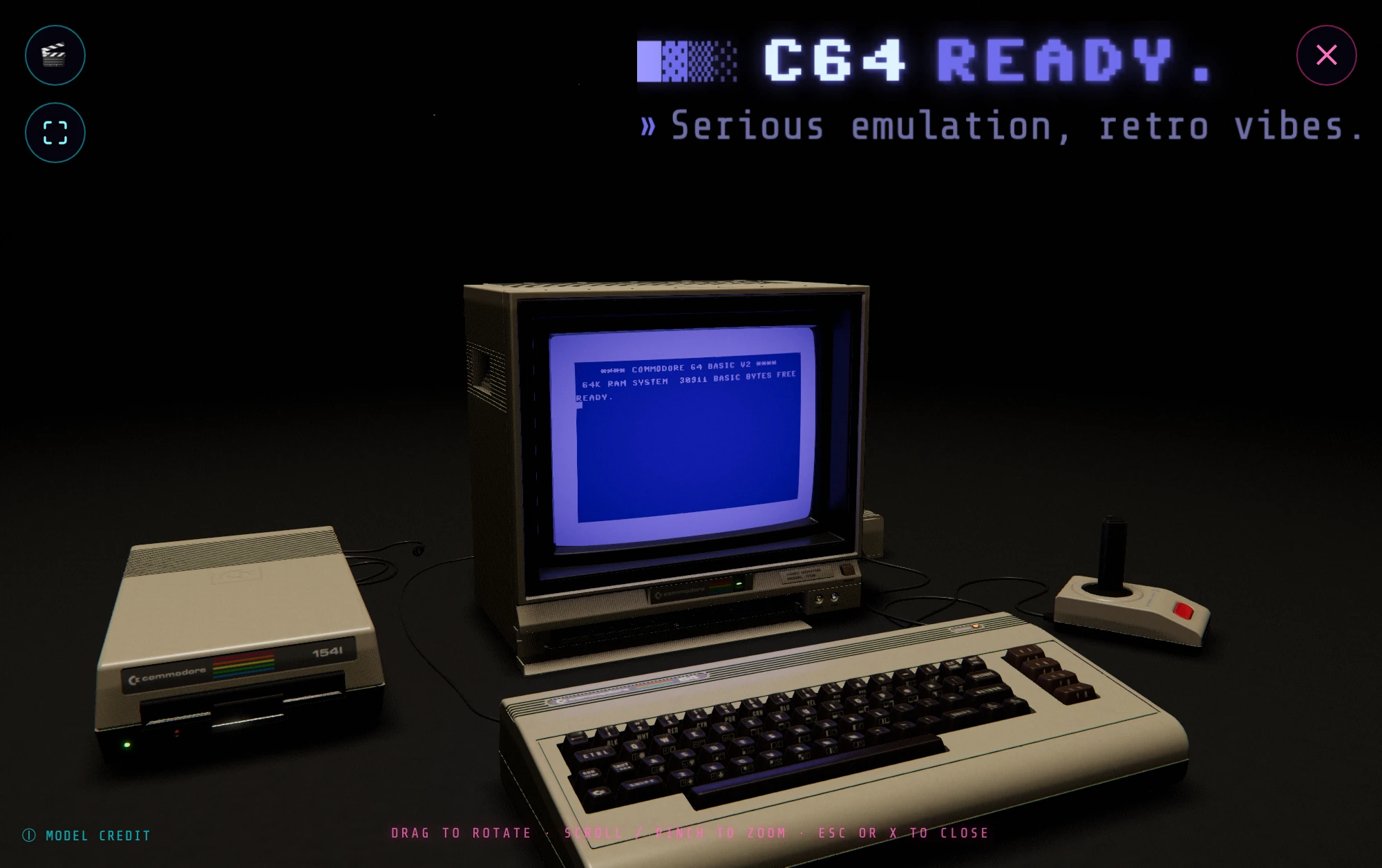
Just want to use it? See Getting started §7 and the Features tour. This document is the implementation deep-dive.
The whole viewer is the ModelViewer class, constructed once around the
#model-viewer-overlay element. It is self-contained: src/main.js
only ever calls open() / close() and wires a handful of callbacks (§9); the
WebGL context, the glTF model, the scenes, the post-processing and WebXR all live
inside ModelViewer. It shares one trait with the powered-off attract animation in
src/vibes/pausedemo.js: both lazy-import three.js on first use
so the library never bloats the main bundle (§10).
The glTF model is "Commodore 64 || Computer (Full Pack)" by dark_igorek, CC BY 4.0, credited in the overlay's ⓘ model-credit popup.
1. Opening & closing#
The 🌇 VIBES button (#btn-vibes, in Controls) opens the viewer. main.js
lazy-imports the module, builds the ModelViewer once, then calls open():
_enterBusy()pauses + mutes the machine (§9) for the heavy transition._ensureRenderer()builds theWebGLRenderer+ its canvas, the shared IBL cubemap and the canvas-level input/XR/context-loss listeners once for the app lifetime, reused across every open/close._initGL()builds the per-open scene/camera/controls/composer (§2; once per open cycle; teardown resets the flag).- The overlay is unhidden and
overlay.requestFullscreen()is requested inside the click gesture (true fullscreen past the browser chrome); it falls back to the CSS full-viewport overlay if the browser refuses. _loadModel()loads the GLB (§8), then the render loop starts viarenderer.setAnimationLoop(this._loop), a WebXR-compatible loop that also drives the per-eye frames while presenting.
Closing happens three ways, all routed to the idempotent close(): the ✕ button
(#btn-model-viewer-close), Esc, or exiting native fullscreen. Esc is
an escape-stack layer pushed by open(), so the overlay outranks any dialog
beneath it; there is no keydown listener of its own, and other keys stay live
so you can type and watch the result on the modelled TV. A fullscreenchange
handler closes the viewer when fullscreen is lost, unless it was left
deliberately to enter VR. close() persists
the camera, hides the overlay, exits fullscreen, stops the loop
(setAnimationLoop(null)), then _teardownGL() disposes the per-open scene while
keeping the renderer and its GL context alive. The next open() rebuilds only
the scene and reloads the model onto the same context; the module-level procedural
texture caches and the IBL cubemap survive (tagged _shared), resident across opens.
Why the context is kept: WebKit does not reclaim a discarded WebGL
context's memory (forceContextLoss() is not honoured there), so a context per
open lets a few enter/exit cycles climb into the gigabytes and trip Safari's
"significant memory" tab reload.
What teardown frees instead, explicitly, via _disposeObject(): geometry,
materials and their textures, each post-processing pass's render targets
(three's EffectComposer.dispose() frees only its own ping-pong targets, not
the passes), reflector/shadow-map render targets, and instanced buffers. (One
residual: a THREE.Water reflection target in the IK+ scene, which Water
exposes no handle to free.) A lost context is recovered by a
webglcontextrestored handler that rebuilds the open scene.
2. The three.js scene#
_initGL() builds everything once:
- Renderer:
WebGLRenderer({ antialias: true, alpha: true }), pixel ratio capped atmin(devicePixelRatio, 2), cleared with alpha 0 so the CSS backdrop shows through,SRGBColorSpaceoutput,ACESFilmicToneMappingat exposure 1.05, soft shadow maps (PCFShadowMap).renderer.xr.enabled = true(§7). - Environment (IBL):
RoomEnvironmentis baked once into a PMREM cubemap so the glossy / clearcoat surfaces catch real reflections; its strength is set per scene viascene.environmentIntensity(envInt). - Camera:
PerspectiveCamera(45, 1, 0.01, 2000), parented in a_riggroup. The rig stays at identity on desktop (camera local space == world space), so it is transparent toOrbitControlsand framing; VR moves the whole viewer by moving the rig (§7). - OrbitControls: left-drag rotate, wheel / pinch zoom, right-drag pan, damping
0.08 for inertia.
zoomToCursor = falseso the dolly runs along the camera→target axis (§3). A slow idle auto-spin (autoRotate, speed 0.35) is restored from its saved state and yields to the user on drag (§6). - Post-processing (
EffectComposer, wrapped in try/catch → plain render on failure):RenderPass→UnrealBloomPass→OutputPass(tone-map + sRGB) →ShaderPass(GradeShader)→SMAAPass.GradeShaderis a gentle cinematic grade (edge chromatic aberration, vignette and film grain) running on the final sRGB image; itsuTime(grain) is advanced each frame in_loop. Each scene'sgradesetsaberration,vignette,grainand optional split-tone colours._applySceneresets all grade uniforms on each switch, including explicit zero values. Spotlight has no chromatic aberration and minimal grain; IK+ Sunset and Bedroom use restrained, separate settings. Bloom parameters are also overridden per scene. When post-processing is actually applied, see §5.
3. Framing, zoom-to-monitor & the persisted camera#
_frameModel() measures the model's Box3 + bounding sphere and pulls the
camera back to dist = (r / sin(fov/2)) × 0.56; the sub-1 factor crops slightly
into the sphere so the flat C64 silhouette fills the frame. It sets the dolly
limits (minDistance = r×0.2, maxDistance = dist×4) and near/far to suit.
The default view orbits and dollies around the live screen: the orbit target is
the centre of the monitor_screen mesh, and because zoomToCursor is off, zooming
moves the camera straight toward the monitor; the CRT is the star. If a saved view
exists it is restored instead (dolly limits are widened so the saved distance is not
clamped away). Four small localStorage keys persist viewer state:
| Key | Holds |
|---|---|
c64emu.modelViewerCamera |
camera position + orbit target (_saveCamera, on the controls end event and on close) |
c64emu.modelViewerScene |
active scene index (§5) |
c64emu.modelViewerAutoRotate |
idle-spin on/off (§6) |
c64emu.modelViewerStudio |
Studio mode on/off (§6) |
4. The live screen: emulator framebuffer → CRT texture#
This is the defining integration: the running C64 picture appears on the
modelled 1702's glass. It is set up by _wireScreen() and refreshed every frame by
_updateScreen():
_wireScreen(root)finds the mesh carrying themonitor_screenmaterial and recomputes clean planar UVs from the glass geometry (local X→u, Y→v) so the framebuffer projects onto it upright and undistorted. It creates aTHREE.DataTextureof 384 × 272 (the VIC-II canvas, see VIC-II) inRGBAFormat/UnsignedByteType,SRGBColorSpace,NearestFilterfor crisp chunky pixels, no mipmaps,flipY = true. It is wrapped in aMeshBasicMaterial({ map: tex, toneMapped: false }), unlit and tone-map-exempt, so the screen reads as a self-emitting CRT at the true VIC palette, untouched by the scene's lighting or ACES grading. A CRT effect (horizontal scanlines, corner vignette, gain) is injected viaonBeforeCompile, after the material's own sRGB decode. The mesh's original material and atlas UVs are kept so the powered-off monitor can be restored exactly as shipped._setScreenLive(live)swaps the glass between the live-feed material (+ planar UVs) and the model's original material (+ atlas UVs), in lockstep._updateScreen()(called first thing in_loop) asks the screen provider for the current frame.null(machine powered off) →_setScreenLive(false), the untouched glass. Otherwise it goes live and, only when the framebuffer array reference changes (the machine is re-created on power / reset), re-pointstex.imageat the new buffer; each display frame it flagstex.needsUpdate = trueso the bytes re-upload. At 10 Hz it also samples a fixed 16 × 12 pixel grid, converts the sRGB bytes to linear light and records average colour + luminance. Spotlight and Bedroom use that allocation-free result throughvibes-crt-light.jsto tint and brighten a smoothed, outward-facing CRT area light. Smoothing uses elapsed time; black, missing or powered-off pictures fade to zero light. Area dimensions track the glass; intensity is luminance and does not need model-scale compensation. Bedroom uses a gentler strength, independently of its decorative television's existing flicker. Neither emitter adds a mesh, shadow map or post-processing pass.
main.js supplies the provider via setScreenProvider(), reusing one
{ data: vic.frameBuffer, width: 384, height: 272 } object while the machine runs,
or returning null otherwise.
5. Scenes (moods)#
Each entry in the module-level SCENES array keeps the same model + camera and
only changes the lighting, surroundings and backdrop. A scene's build(group, ctx) adds its lights and props to a group that is torn down wholesale on
switch, and an optional animate(group, t) runs each frame. envInt scales the
IBL, and a scene may replace the shared neutral RoomEnvironment PMREM with its
own via envMap(renderer); IK+ bakes one from its sunset sky. bg / fog /
tone / exposure / bloom tune the look. The 🎬 button
(#btn-model-viewer-scene)
calls nextScene() → _applyScene(), which disposes the old group, builds the new
one, applies its env-intensity / tone-mapping / background / fog / bloom, and persists
the index.
| # | name |
Backdrop / mood | Post pipeline |
|---|---|---|---|
| 0 | Synthwave | dark neon highway toward a banded sun: scrolling grid, mountain silhouettes, palms, stars | basic; raw tone map (NoToneMapping), derivative-filtered grid and road, sun and horizon glow faked in-shader; inverse-square neon lights with intensity scaled by model radius squared |
| 1 | Starry Plain | dark Tron-grid plain: scanner ripple, star layers, a procedural Milky-Way band, shooting stars | basic; raw tone map |
| 2 | Spotlight | near-black studio: overhead spotlight, beam dust, screen-coloured CRT spill | full composer (bloom dialled near-off + grade + SMAA) |
| 3 | IK+ Sunset | stone courtyard at dusk: torii and low sun over reflective water, autumn maple, layered headlands | full composer (bloom + warm halation + dusk split-tone grade); cool-shadow sunset IBL via envMap; ACES exposure 0.66, purple haze fog |
| 4 | 80s Bedroom | messy teenager's bedroom at night: amber desk-lamp pool, live monitor spill, moon shaft, posters, wood-grain CRT, drifting dust | full composer (bloom + amber halation + teal/amber grade) |
Scenes flagged basic render with a plain renderer.render and bypass the composer;
the bloom + grade + SMAA pipeline runs for the non-basic scenes
(Spotlight, IK+ Sunset, 80s Bedroom), while Synthwave and Starry Plain further use raw tone mapping and
bake their glow into their own shaders. Backdrop gradients are cached equirect
CanvasTextures; the procedural props (room textures, star sprites, sunset sky/sun,
water normal map, checker floor) are built once and cached at module level.
Bedroom and Spotlight set staticShadows. vibes-shadow-cache.js watches the
casters, their ancestors, shadow lights and light targets. Transforms, visibility,
vertex/index buffer versions (including animated keycaps), instanced matrices and
shadow camera parameters invalidate the maps. Camera orbit, light intensity and
non-casting dust do not. Scene switches rebuild dependencies and request fresh maps;
reparenting tracked objects rebuilds the dependencies too. Code adding casters to
an existing scene must call the cache's rebuild().
IK+ refreshes its offscreen water reflection at 30 Hz, reducing the extra scene render and associated shader-program cache work. The water's wave time still advances every display frame. Projection changes and XR eye renders bypass the rate limit. Starry keeps one hidden meteor, reusing its geometry, material and direction vector; its maximum lifetime is shorter than the minimum spawn interval.
6. Interactions on the model#
- Double-click to boot. A
dblclickanywhere on the canvas firesonDoubleClick;main.jswires it to power the C64 on when it is off (reusing the power button's full boot path), so the modelled TV lights up. - Idle auto-spin. A plain click (press + release under a 5 px threshold, so a
rotate-drag never triggers it) toggles the
OrbitControlsidle spin; each restart reverses direction. The choice is saved tolocalStorage. - Studio mode (Cmd/Ctrl+Shift+X). Strips the viewer to the scene and the
C64 READY. logo (no hint, no credit, no buttons, no mouse pointer) for
screenshots and video. Everything hidden is CSS-only (a
.studioclass on the overlay), so the render loop, the camera and the live screen texture carry on untouched. The shortcut is the only way in and out (from a closed viewer it opens straight into Studio mode); Esc keeps its usual job of closing the viewer. The preference persists (isStudio()/setStudio()/_applyStudio()), so the viewer reopens as bare or as furnished as it was left. - Keycap press. The RETURN keycap on the
computer_keyboardmesh gets a small press animation (attachKeycapPresses, advanced each frame viathis._keycap.update()). - Power LEDs. The GLB bakes each LED lens into a shared mesh.
_wireLeds/_recolorLeds/_wireMonitorPowerLedisolate a lens's triangles, by base-texture hue within a gated region or, for the monitor lamp, by a world-space box plus a face-normal test, then reindex them into their own geometry group with a dedicated emissive material._loopramps each material'semissiveIntensityfrom the emulator state:
| LED | Location | Driven by |
|---|---|---|
| C64 power (red) | case top, by the badge | machine powered on |
| 1541 power (green) | drive front, bottom-left | machine powered on |
| 1541 read/activity (red) | drive front, at the slot | 1541 read/activity |
| 1702 power (green) | monitor front lamp window | machine powered on |
7. WebXR VR mode#
Immersive-VR renders the scene in stereo with head tracking. The 🥽 ENTER VR
button (#btn-model-viewer-vr) starts hidden and _initVrButton() reveals it only
when navigator.xr.isSessionSupported('immersive-vr') resolves true, i.e. a real
headset or the WebXR emulator browser extension, so it never appears on desktop
without VR or on any phone / tablet. It stays disabled until the model is loaded and
framed, because the rig is seeded from the current camera.
_toggleVr() first exits DOM element-fullscreen (in fullscreen the browser will
not route pointer events to elements outside the fullscreen element, which would leave
the injected page controls visible but dead), suppressing the auto-close, then
requests immersive-vr with the optional local-floor feature. On
sessionstart, _onXrStart() pauses and mutes for the first per-eye shader
compile, disables the orbit controls, hides the 2D overlay and snapshots the
desktop camera pose. It places the rig at that world pose so VR continues from
the exact 3D view (1:1 scale) with the headset pose added on top. A plain
hemisphere fill light is added because VR skips the composer. On sessionend,
_onXrEnd() synchronously restores
the desktop camera (position, orientation, fov, target), so no headset pose is ever
persisted, then re-enables controls and re-grabs fullscreen. In VR, _loop always uses a
plain renderer.render (the EffectComposer is not XR-compatible), so the neon
post-processing is skipped and the headset view is flatter than the 2D view.
8. Screen-adaptive model resolution#
The model ships in two GLB builds. _loadModel() calls resolveModelUrl()
when loading the model, so reopening the viewer uses the current preference:
commodore_64_4k.glb: a heavy 4K-texture build (~95 MB) for large screens.commodore_64.glb: a lighter build (~18 MB) for phones and tablets.
resolveModelUrl() defaults to the lighter commodore_64.glb on every device; the
4K build's large single-open memory peak makes the light model the safe default.
The user can change this in Options ▸ Display ▸ 3D MODEL
(#btn-vibes-model), which cycles SMALL → AUTO → LARGE and stores the choice
under c64emu.vibesModel, read fresh on each open. SMALL (default) forces
the light build and LARGE the 4K build. AUTO defers to
autoWantsLargeModel(): 4K only when the longest screen dimension is ≥ 1024 CSS
px and the device is not touch (navigator.maxTouchPoints > 0 /
ontouchstart), so phones and tablets get the light asset. The path is resolved
against Vite's BASE_URL so it stays correct under a
non-root deploy. GLTFLoader reports load progress into the overlay's
LOADING MODEL… label.
9. Integration with main.js#
main.js builds the viewer lazily (_ensureModelViewer() → import('./vibes/retrovibes.js'))
and injects everything it needs through setters, reading the machine fresh each call
because it is re-created on power / reset:
| Setter | What main.js supplies |
Used for |
|---|---|---|
setScreenProvider |
reused { data: vic.frameBuffer, width: 384, height: 272 } while running, else null |
live CRT texture (§4) |
setOnDoubleClick |
power the C64 on when off (powerBtn.click()) |
double-click-to-boot (§6) |
setPowerProvider |
running |
C64 / 1541 / monitor power LEDs (§6) |
setDriveActiveProvider |
`drive1541.ledOn | |
setTouchControls |
the existing #touch-controls element |
keep the touch joystick inside the active fullscreen element |
setBusyHooks |
pause + mute / resume, the same mechanism as the PAUSE button | freeze the machine across heavy transitions |
The fullscreen API only displays and routes pointer input to descendants of its fullscreen element. On open, the viewer therefore moves the existing touch-control element from the 2D monitor into its overlay before requesting fullscreen; on every close path it restores the element to its original DOM position. The element keeps the same listeners and joystick state throughout.
The busy hooks matter for audio: open(), close(), scene swaps and VR entry all
stall the main thread (GL init, model load, scene build, first shader compile,
exit-fullscreen reflow), which would starve the SID AudioWorklet's ring buffer and
make the sound jerk. ModelViewer holds the machine paused across each transition and
resumes only once the scene has actually rendered a couple of frames and the resizes
have settled (_loop's busy-exit logic); close() resumes off a short timer since the
loop is already stopped.
10. Performance notes#
- Lazy chunk. three.js and its addons (~700 kB) are imported only on the first open, so they split into their own bundle chunk instead of weighing down startup.
- Runs only while open. The render loop is a
setAnimationLoopstarted inopen()and cleared inclose(), so the viewer costs nothing when closed;_updateScreenalso bails unlessrunning. - Scene teardown on close.
_teardownGL()frees every per-open resource and reference but keeps the renderer/context and the_sharedmodule-level caches alive for the next open; the full disposal inventory and the WebKit rationale are §1's. - Cheaper scenes skip the composer.
basicscenes render plain (§5), and the device-adaptive model (§8) keeps phones on the light asset.
11. Key invariants & gotchas (quick reference)#
- One WebGL context for the app lifetime: only the per-open scene is ever rebuilt. Never create a context per open: WebKit does not give the memory back (§1).
- The fullscreen element owns pointer input: the touch-control element is reparented into the overlay before fullscreen is requested and restored on every close path, keeping its listeners and joystick state (§9).
- The CRT material is unlit and tone-map-exempt (
toneMapped: false), so the live screen shows the true VIC palette untouched by scene lighting or grading (§4). - Every heavy transition runs inside the busy hooks (open, close, scene swap, VR entry); an unpaused machine would starve the SID worklet's ring and the sound would jerk (§9).
- VR skips the composer (plain render + a hemisphere fill light), and the desktop camera pose is restored synchronously on session end; a headset pose is never persisted (§7).
- Esc is an escape-stack layer, not a
keydownlistener: the overlay outranks dialogs beneath it while every other key stays live to the C64 (§1), and it closes the viewer in Studio mode too (§6).